Categories


PreviousNext
How to set Password for Excel Workbook?     12 Up 2 Down
 Send mail Views:27217
Belongs to : MS Office
Facebook Bookmarkbookmark this pageStumbleupon Bookmark 


Sometimes we have entered some secret content in excel sheets.

To allow only authorized reviewers to modify your content you can set password for it.


1. Open the Excel workbook file.

2. Goto -> File -> Save As

3. A small window will open. Click onto Tools.

xcel.png

4. Goto General Options.

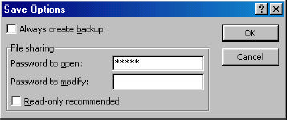
5. Then a small window named Save Options will open.

6. Enter the area in Password to open and Click OK.
pass1.png

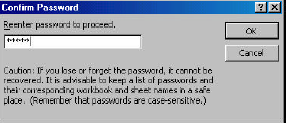
7. In Confirm Password screen, type the password again in Reenter password to proceed area, then click OK.
pass2.png

8. Password has been set to Excel Workbook.

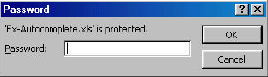
The next time someone tries to open the Excel workbook they get this prompt.
pass3.png

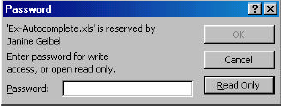
If a password was set for Password to modify, in addition to Password to open, you will also see the following prompt to Enter password for write access, or read only.

Enter the 'modify' password in Password area, then Click OK.
pass4.png


funny pictures and videos
online games
embed code


By - Sanju, On - 2008-07-10
Send This
PreviousNext

User Comments

1) thanks a ton
Name: AshwiniMail: kandiashwini........Added: 2012-01-03

2) lovely... nice
Name: PhaneendraMail: gudiwada.phaneendra........Added: 2011-12-28

3) thank you my friend
Name: rajuMail: bogala.raju........Added: 2011-12-26

4) Yes it is very useful thanks for your effects....
Name: PreethpalMail: preethpal.wst........Added: 2011-12-24

5) thanks mate
Name: brianMail: brian........Added: 2011-09-06

6) Thanks for Password method thak you soooo much.......! HAPPY FRIENDSHIP DAY!!!!
Name: surajMail: surajkharate........Added: 2011-08-03

7) thank you
Name: gafoorMail: ajchkchj........Added: 2010-10-18

8) this is great.thanks!
Name: raineverMail: rainever_12........Added: 2009-10-07

9) THX iTS FANTASTIC FOR ME, Do you know how to use this password in vb.net, What will be the connection string for password xls workbook 1s again thx for Password method
Name: ABHIMail: abhishek1singh........Added: 2009-09-07


Add NEW Feedback:

Name :     Email :

Website Monitoring Web hosting by Hiox India Contact Us   Privacy Policy   Terms and Conditions