Steps to insert SWF files into Powerpoint
by Geethalakshmi[ Edit ] 2008-09-20 17:06:41
Steps to insert SWF files into Powerpoint
1. Open up your PowerPoint presentation. Select the page into which you want to insert the animation into.
2. Go to View - Toolbars - Control Toolbox and click on the icon which looks like a little hammer.

3. Select "Shockwave Flash Object" from the list.
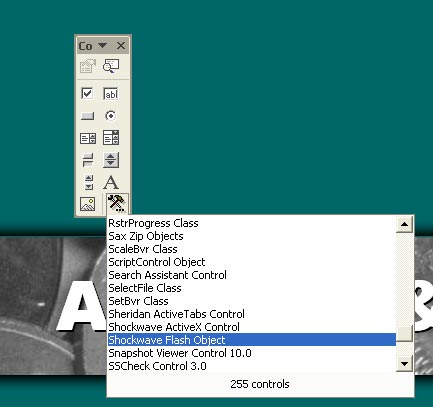
4. Drag a square onto the place where you want the SWF file to appear.

5. After you have done this, right-click on the box, choose properties, and the properties menu will pop up.

6. To add the SWF file you must click on "Custom", and select the "Build" icon (the three dots at the end of the line).

7. Now enter the Movie URL (make sure that you enter the correct path!) and tick the "Embed Movie" box as well.
8. Finally, save and run your slide show in presentation view.
